Building a Google-Like Search Engine (Sort of)
Here I’ll explain how I built a simple search engine that theoretically could replace Google (if you were rich enough).
NOTE: This project includes some poor design choices, I didn’t intend to beat Google, and everything was coded in just two days.
If you want to skip my yapping skip to here
My search engine for the internet#
I put together a small project that does what Google.com does with far less usability. The output for a given query is a bit messy (so I can’t really compare it to Google).
For this, we need something that crawls the internet indefinitely and indexes the results in a search engine.
It’s built in several parts:
- Web Crawler
- HTML parser/cleaner
- OpenSearch as index
- PostgresQL as database to store crawler results
- A nice page to run queries and see the results
What is a search engine?#
A search engine is a piece of software designed to perform searches based on user queries and return a list of relevant results.
Every component is important, from gathering data and building the index to returning accurate results even when the user’s query is poorly written.
There are many techniques for delivering accurate results. Nowadays, everyone uses AI to enhance output through semantic search and similar methods, but I won’t go into that level of detail here.
Scraping the internet#
When you search something on Google and see Reddit results, that means Googlebot (their crawler) actually visited that page and indexed it. You might also notice that results are often up to date, this tells us what we’re dealing with: we need to crawl aggressively to maintain a useful index.
If people are discussing the latest Counter-Strike match from yesterday, we might not have that data yet.
Access to data can be restricted in many ways. Websites may provide a robots.txt file that scrapers are expected to follow or employ other blocking tactics to prevent downloads. And no, launching 30 workers hitting a page 20 times per second would probably get you banned from the internet.
For that reason, each company may suggest specific ways for us to index their content.
robots.txt#
This is the reddit one
# Welcome to Reddit's robots.txt
# Reddit believes in an open internet, but not the misuse of public content.
# See https://support.reddithelp.com/hc/en-us/articles/26410290525844-Public-Content-Policy Reddit's Public Content Policy for access and use restrictions to Reddit content.
# See https://www.reddit.com/r/reddit4researchers/ for details on how Reddit continues to support research and non-commercial use.
# policy: https://support.reddithelp.com/hc/en-us/articles/26410290525844-Public-Content-Policy

User-agent: *
Disallow: /
At first glance, we can see that any Usmer-Agent that atches that wildcard, is not allowed to visit anything under /, effectively blocking everything.
All of this follows the rules defined at http://www.robotstxt.org/ where you can check all the details.
Reddit for instance provides an API in order to get data like comments, posts, etc.
Here is a cut from x.com (https://x.com/robots.txt)
# Google Search Engine Robot
# ==========================
User-agent: Googlebot

Allow: /*?s=
Allow: /*?t=
Allow: /*?ref_src=
Disallow: /[_0-9a-zA-Z]+/likes
Disallow: /[_0-9a-zA-Z]+/media
Disallow: /[_0-9a-zA-Z]+/photo
Allow: /*?

User-agent: facebookexternalhit

Allow: /*?lang=
Allow: /*?s=

# Every bot that might possibly read and respect this file
# ========================================================
User-agent: *
Disallow: /
As you can see, it specifies what Googlebot can or cannot do. The interesting part for us is the wildcard * section, where everything is disallowed.
sitemap.xml#
Other sites might block everything except what’s listed in their sitemap.xml. This file is very common and usually provides a direct list of all URLs a server hosts.
For example, the Elixir library repository, hex.pm, offers a sitemap.xml with links to each public library.
 1<urlset
 2	xmlns="http://www.sitemaps.org/schemas/sitemap/0.9"
 3	xmlns:xsi="http://www.w3.org/2001/XMLSchema-instance" xsi:schemaLocation="http://www.sitemaps.org/schemas/sitemap/0.9 http://www.sitemaps.org/schemas/sitemap/0.9/sitemap.xsd">
 4	<url>
 5		<loc>https://hex.pm/packages/a11y_audit</loc>
 6		<lastmod>2025-03-05T17:53:10Z</lastmod>
 7		<changefreq>daily</changefreq>
 8		<priority>0.8</priority>
 9	</url>
10	<url>
11		<loc>https://hex.pm/packages/aa</loc>
12		<lastmod>2023-02-16T17:49:42Z</lastmod>
13		<changefreq>daily</changefreq>
14		<priority>0.8</priority>
15	</url>
16	<url>
17		<loc>https://hex.pm/packages/aadya</loc>
18		<lastmod>2018-03-12T02:19:58Z</lastmod>
19		<changefreq>daily</changefreq>
20		<priority>0.8</priority>
21	</url>
22	<url>
23		<loc>https://hex.pm/packages/aasm</loc>
24		<lastmod>2019-06-10T11:37:56Z</lastmod>
25		<changefreq>daily</changefreq>
26		<priority>0.8</priority>
27	</url>
This is extremely convenient because it lets us scrape all pages directly without having to discover them by following links. Otherwise, we might miss a library entirely if nothing else on the web links to it.
(Some other websites will have an index of indexes)
A note on scraping#
After reading this, you might be thinking, “Okay, scraping is bad!” But think about companies like OpenAI, which basically scraped large portions of the internet to build massive datasets for training AI, or Google, which provides up-to-date results by ingesting massive amounts of data, think about how many Watts is that!
If you run a server, depending on your goals, you’ll have to make some decisions. Ultimately, you want to be visible to search engines but maybe not to OpenAI.
If you’re curious about the indexing side of things, just search for SEO on Google — you’ll find thousands of influencers talking about it.
The Crawler#
Crawler/Spider/Scraper for me they are all synonyms. The crawler will do several things
- Check for robots.txt
- Check sitemap.xml
- Download a page if not blocked
- Extract every link possible
- Parse the HTML in order to get important stuff for the index
- Store somewhere the urls that we found on the page and or sitemap.xml
Here is an example of how my crawler works
 1def crawl(domain) do
 2    Logger.info("Scraping: #{URI.decode(domain.base_url)}")
 3
 4    uri = URI.new!(domain.base_url)
 5    {:ok, rules} = Search.RobotsCache.get_robots(uri.scheme <> "://" <> uri.host <> "/")
 6
 7    if Search.Parser.Robots.allowed?(URI.decode(uri.path || "/"), rules["*"]) do
 8      :get
 9      |> Finch.build(domain.base_url, headers())
10      |> request(@max_redirects)
11      |> process_document(domain.base_url)
12
13      Domains.change_status(domain, "crawled")
14    else
15      Domains.change_status(domain, "blocked")
16    end
17end
As you can see, Search.RobotsCache.get_robots fetches and parses the robots file, returning a structure like:
1%{
2   "*" => %{
3     "allow" => ["/w/rest.php/site/v1/sitemap", "/api/rest_v1/?doc",
4      "/w/load.php?", "/w/api.php?action=mobileview&"],
5     "disallow" => ["/wiki/Wikipedia_talk:Administrator_elections",
6      "/wiki/Wikipedia_talk:Administrator_elections",
7      "/wiki/Wikipedia:Administrator_elections",
8[...]
Each key represents a bot name, and its allow and disallow rules.
Of course, I’ve named my crawler, but since it’s unknown, I just match against "*". That’s why the allowed? function uses rules["*"].
Once we fetch a page, we process it and mark it as crawled or blocked. This lets us track which URLs are off-limits, so we don’t revisit them soon.
Document parsing#
Once we’ve downloaded a page, we go through it to extract all the links and then index it in our search engine (in my case, OpenSearch).
To extract links, I use Floki, which makes the process ridiculously simple. We still need to normalize each URL, since we don’t care about mailto: links, anchors, and other non-HTTP links.
1def extract_urls(html, base_url) do
2    html
3    |> Floki.find("a[href]")
4    |> Floki.attribute("href")
5    |> Enum.map(&normalize_url(&1, base_url))
6    |> Enum.reject(&is_nil/1)
7    |> Enum.uniq()
8end
This is the output:
 1[
 2  %URI{
 3    scheme: "https",
 4    userinfo: nil,
 5    host: "blog.0x2d.dev",
 6    port: 443,
 7    path: "/",
 8    query: nil,
 9    fragment: nil
10  },
11  %URI{
12    scheme: "https",
13    userinfo: nil,
14    host: "blog.0x2d.dev",
15    port: 443,
16    path: "/blog/",
17    query: nil,
18    fragment: nil
19  }
20[...]
21]
Next, we extract some text data that will be used for indexing and searching. Since I’m building a very simple search engine, I’m not doing anything too advanced here:
1def parse(html, base_url) do
2%{
3	url: base_url,
4	title: extract_title(html),
5	headings: extract_headers(html),
6	paragraphs: extract_paragraphs(html),
7	meta_description: extract_meta_description(html)
8}
9end
In short, this function extracts the <title>, all header tags (h1, h2, h3, …), all paragraphs <p>, and the meta description.
The title and meta description are displayed in the search results, while everything together gets indexed.
I won’t go into detail about how OpenSearch handles indexing, but you can imagine that the more metadata we extract, the better the index we can build. For example, we could detect the language of each document and create a language-specific index optimized for better searches in that language.
An example for my blog index page
document: %{
  title: "0x2D Blog",
  url: "https://blog.0x2d.dev",
  headings: ["Hello and Welcome!"],
  paragraphs: "I’m a passionate programmer with a deep love for code and technology. Over the years, I’ve explored various areas such as:I always try to finish my projects, although sometimes other interesting things catch my attention along the way. To share my experiences and problem-solving journey, I maintain a blog where I write about personal insights and lessons learned. You can check it out here.If you want to send me a message or share some love for code, I’d be more than happy to hear from you!",
  meta_description: ""
}
Here’s my processing function:
 1defp process_document(binary, base_url) do
 2    html = Floki.parse_document!(binary, attributes_as_maps: true)
 3
 4    # get sitemap and uris if not visited
 5    sitemap_urls = get_sitemap(base_url)
 6    page_urls = Search.Parser.HTML.extract_urls(html, base_url)
 7    page_document = Search.Parser.HTML.parse(html, base_url)
 8
 9    Search.OpenSearch.index_page(page_document)
10
11	mapper = fn url ->
12	 %{
13        parent_domain: url.host,
14        base_url: to_string(url),
15        crawl_status: "pending",
16        crawl_delay: 1,
17        inserted_at: DateTime.utc_now(),
18        updated_at: DateTime.utc_now()
19      }
20	end
21
22	# Store every url we found
23    (page_urls ++ sitemap_urls)
24    |> Enum.map(mapper)
25	|> then(Search.Repo.insert_all(Search.Schema.Domain, &1))
26end
And that’s it!, now we should be able to query our index and get results.
The Search bar#
After 30 min of crawling starting from wikipedia I got the following results when searching for Elixir:
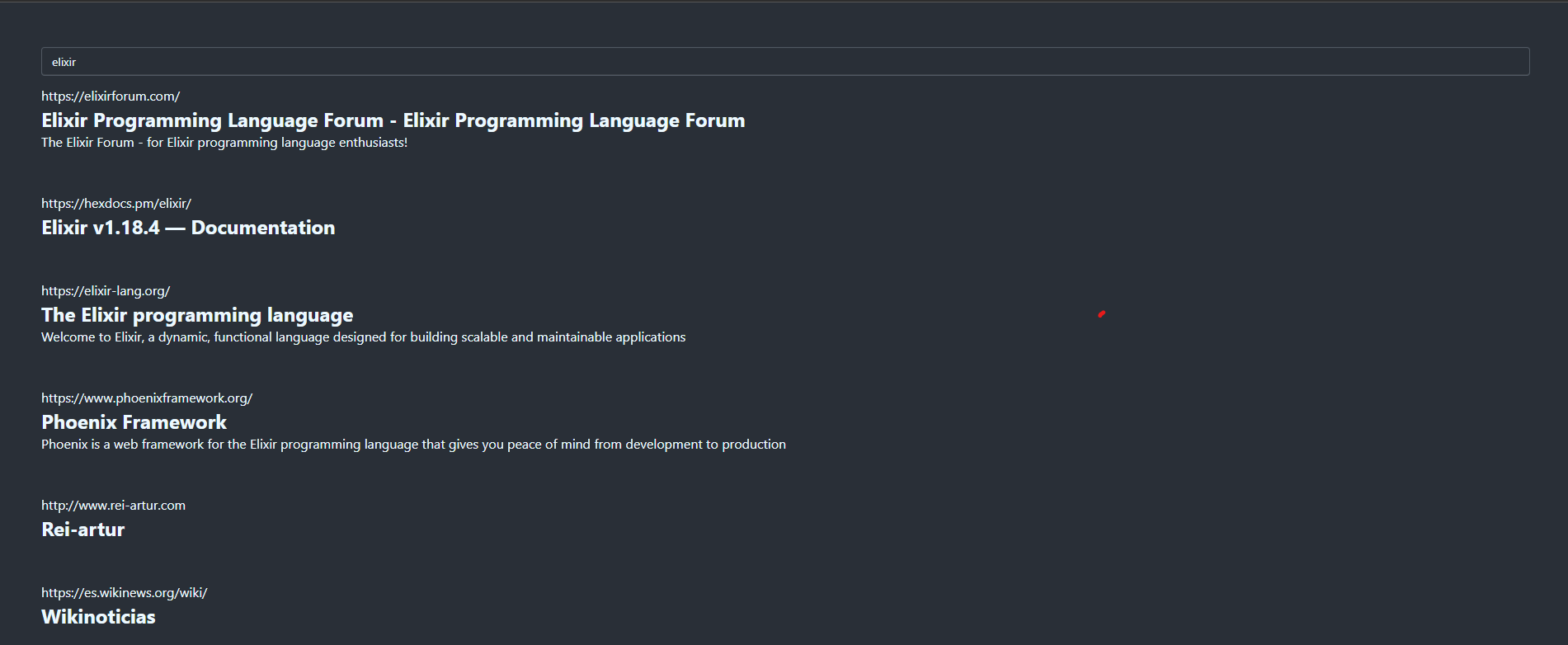
I’m really happy about the results, I’ve indexed about 15k documents and my DB contains almost 2 millions of URLs ready to be crawled! I don’t have more simply because I’m running only 10 workers with a delay of 500ms per base URL crawling in huge volume might get me banned quickly.
What I’ve learned#
After coding and stitching together all the parts, the first thing that came to mind was how much infrastructure a company like Google must have to index the entire internet.
And not just that, in my case, I’m only crawling each page once, but the internet is alive and changes every day…
Finally, I want to thank OpenSearch, which did most of the heavy lifting. Maybe someday I’ll build my own search engine from scratch, but that’s a story for another time.
Thanks for reading!